The
Twitter application on Facebook has an optional feature that's kinda cool but has a really annoying side effect. I'll get to the side effect in a minute and tell you how to fix it.
If you go to
http://apps.facebook.com/twitter/ and click on "Want Twitter to update your Facebook status? Click here!", Twitter will thereafter permanently update your Facebook status (i.e. the "[First name] is ..." text) whenever you post a message on Twitter (with the exception of replies or references to other Twitter peeps using the at symbol followed by the Twitter username, e.g. @
theJoshMeister). So if I post "There's a new episode of Tech Pulse up at http://techpulsepodcast.com !!!" on Twitter, my Facebook status would then change to say "Josh is twittering: There's a new episode of Tech Pulse up at http://techpulsepodcast.com !!!"
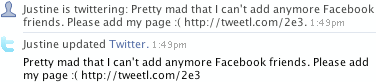
Now here's the annoying side effect: Your Facebook News Feed and Mini-Feed will now double-post every time you update Twitter. (First you'll get an item in your feeds with the Twitter "t" logo and the contents of your new tweet, and then immediately after that you'll get a Facebook status update with the exact same contents, but preceded by "[First name] is twittering: ".) Here's a visual example from the profile of another Facebook and Twitter user, iJustine:
After a lot of frustration, I finally found a setting that will allow you to go back to having just one instance of your Twitter message in your feeds. Basically, you just have to remove the Twitter application's permission to post messages in your feeds. Here's how:
1) Log into Facebook (if necessary)
2) Go to
http://www.facebook.com/editapps.php?3) Next to "Twitter", click on "Edit Settings"
4) Uncheck "News Feed" and "Mini-Feed", and then click "Save"
To clarify: this disables the feed items that have the Twitter "t" logo, but it leaves the "[first name] is twittering: " status update feed items enabled.
I hope this helps someone out there who has been as annoyed by the dual Facebook feed posts as I was. If you found this tip useful (or any other on this site), please consider making a donation:
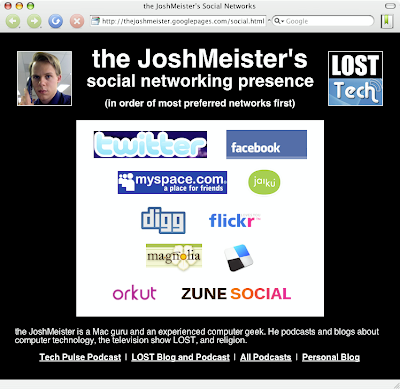 My list currently includes Twitter, Facebook, MySpace, Jaiku, Digg, Flickr, Ma.gnolia, del.icio.us, Orkut, and The Zune Social (uh, no, I don't own a Zune, but I had to create an account to submit my podcasts to the Zune podcast directory). Feel free to add me to your networks!

